Spreadsheet for Excel and Google Sheets
Debt Payoff Pro
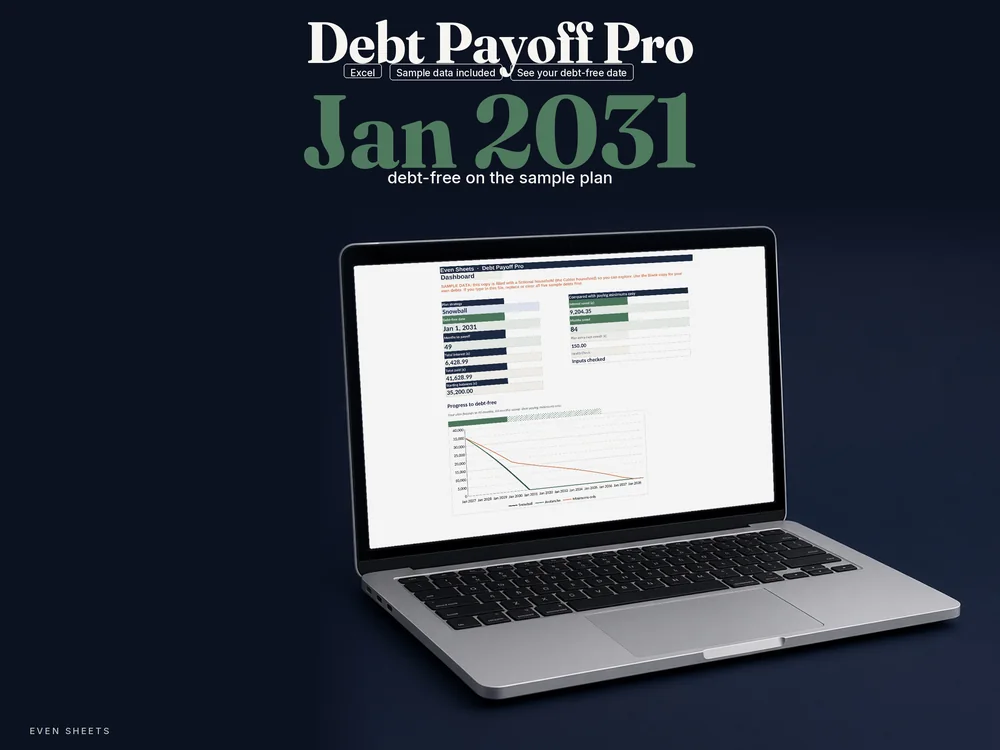
See the payoff date. Compare snowball and avalanche. Try a different extra payment.
Enter each debt, pick snowball or avalanche, and add an extra if you can. You get a full month-by-month amortised schedule, a side-by-side comparison with a minimums-only baseline, and a what-if for a different extra, including a debt-free date, months, total interest and total paid. When a debt is paid off, its minimum stays in the monthly budget and rolls to the next target.
- Excel + Google Sheets
- Blank + sample copy
- Up to 10 debts
See price on Etsy
Etsy shows the final price in your currency, including any tax, before you pay. UK listings include VAT. Checked 24 November 2026.
You’ll complete your purchase on Etsy, which shows the final price in your currency (including any tax) before you pay. Instant digital download; nothing is shipped.
Why it’s different
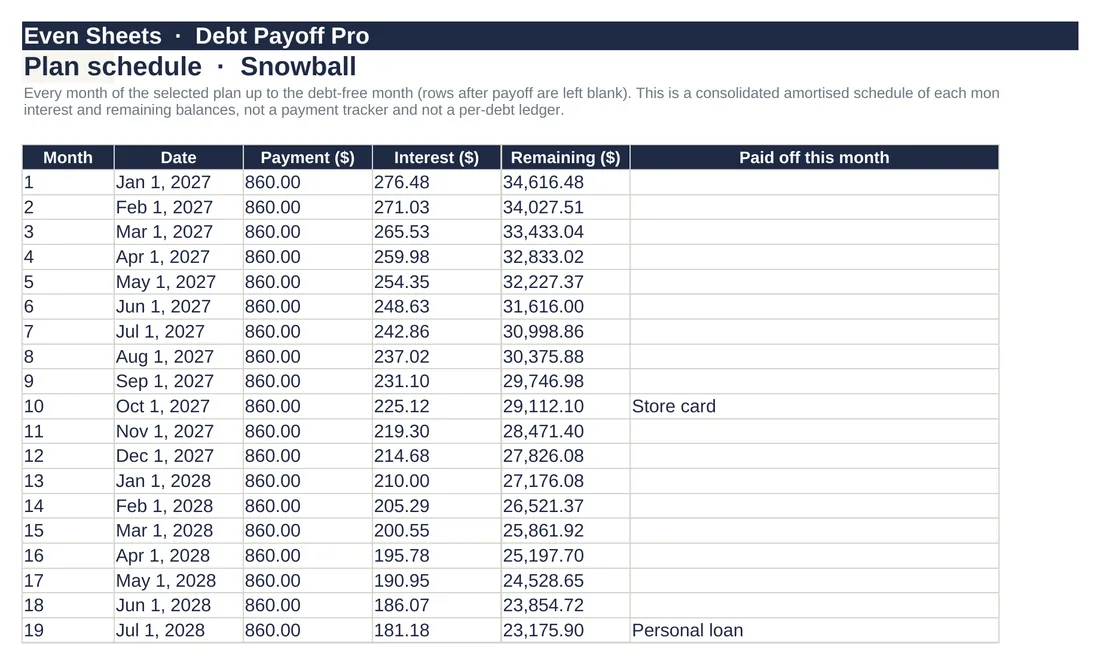
- A full amortised payoff schedule, month by month (payment, interest, remaining balance, and which debts are paid off that month)
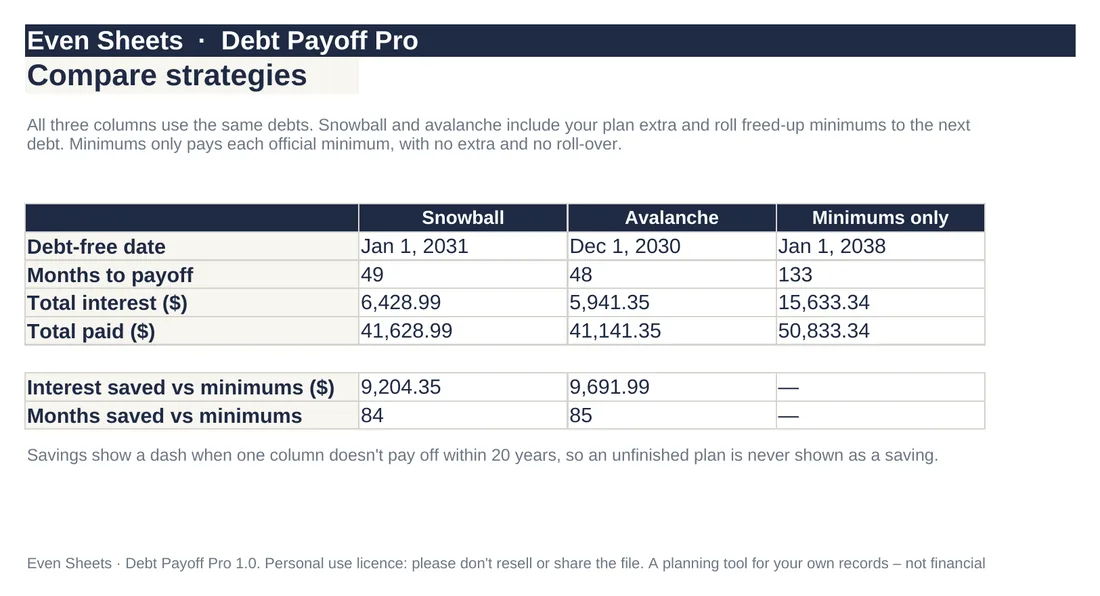
- Snowball vs avalanche, compared with paying minimums only
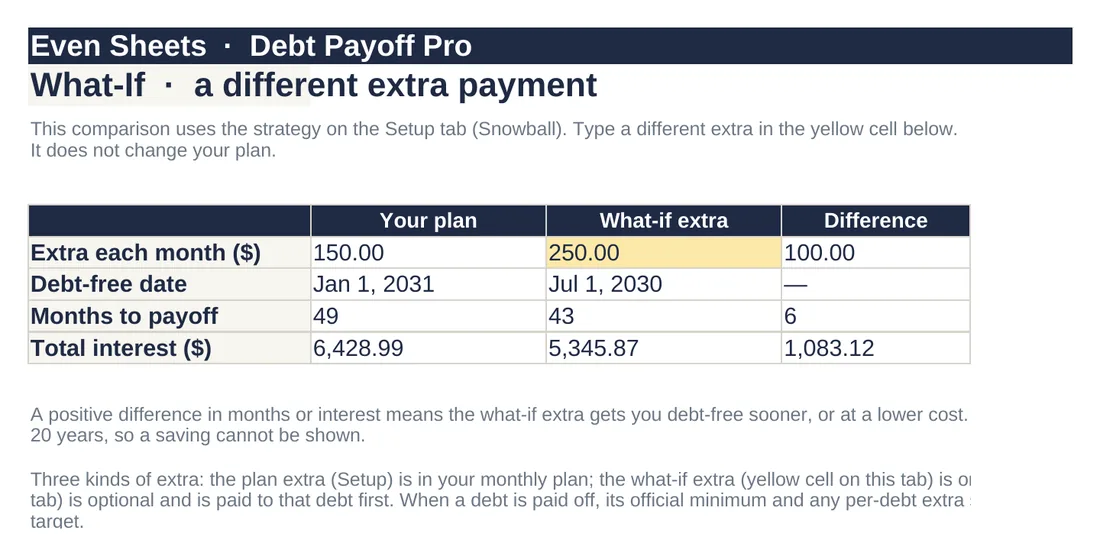
- An extra-payment what-if that does not change your plan
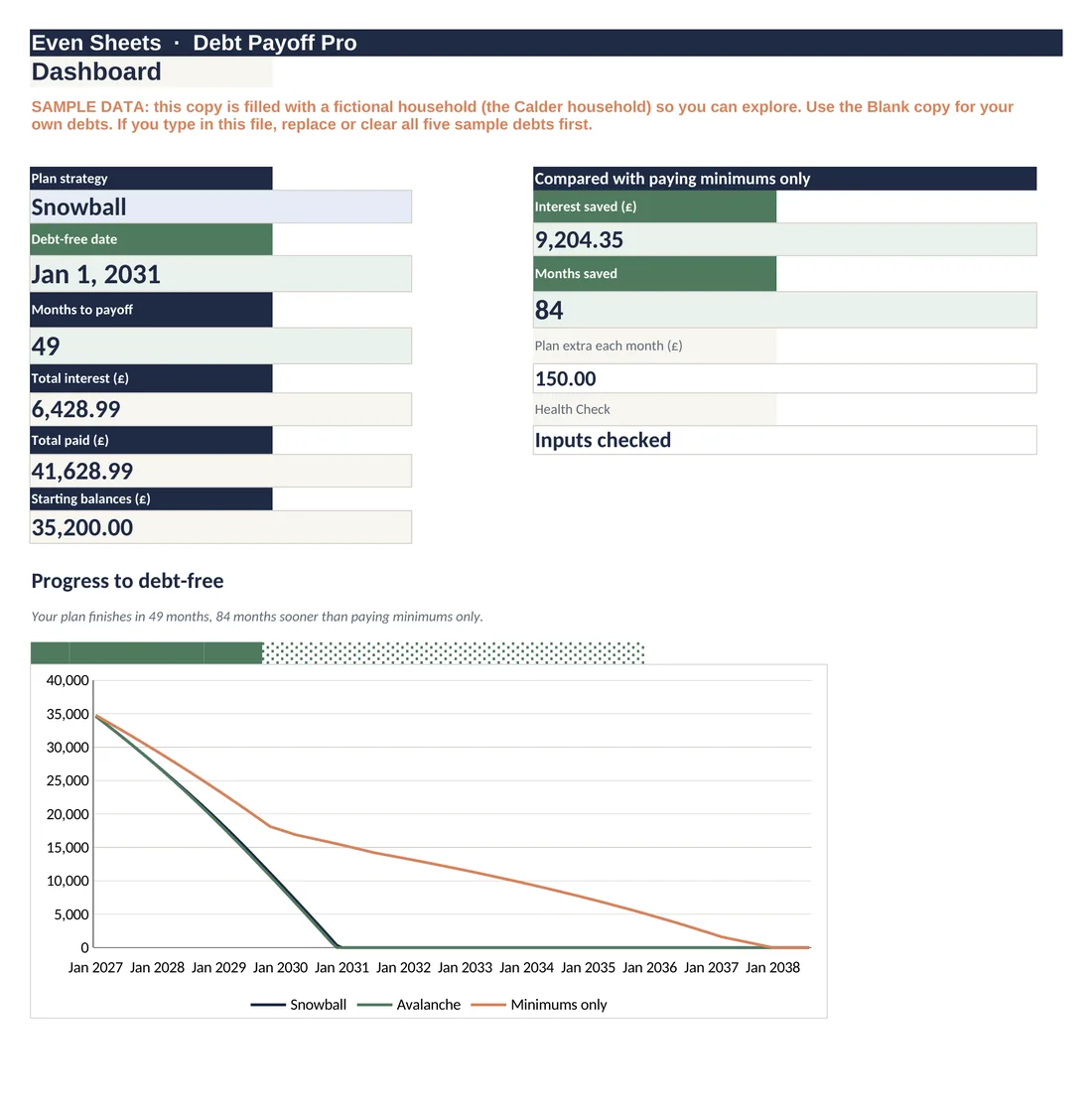
- A debt-free date, months, total interest and total paid
- Works in Microsoft Excel and Google Sheets: opened live in both and checked value by value
- Any currency symbol ($, £, €, A$, C$…): type it once in Setup
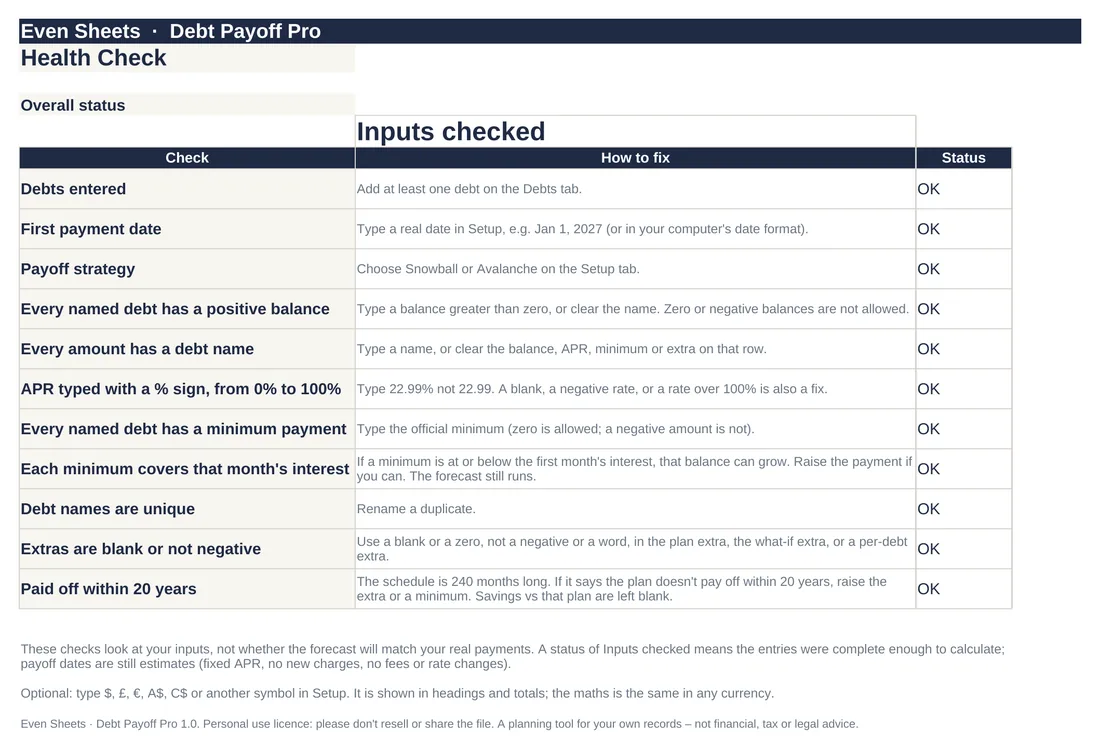
- Tested formulas: every formula checked against an Excel 2010-safe list, and the sample schedule matched a payoff engine. A Health Check tab with 11 checks and a plain-English fix for each
- Classic formulas only: no macros, no bank login
See it in action
22-second silent demo with captions, built from screens of the Sample file (fictional household).
Real screens from Debt Payoff Pro
Screenshots of the included Sample file, filled in with a fictional household.
What’s inside (8 tabs)
- Start Here: 3-step setup
- Setup: currency, first payment date, snowball or avalanche, and the plan extra
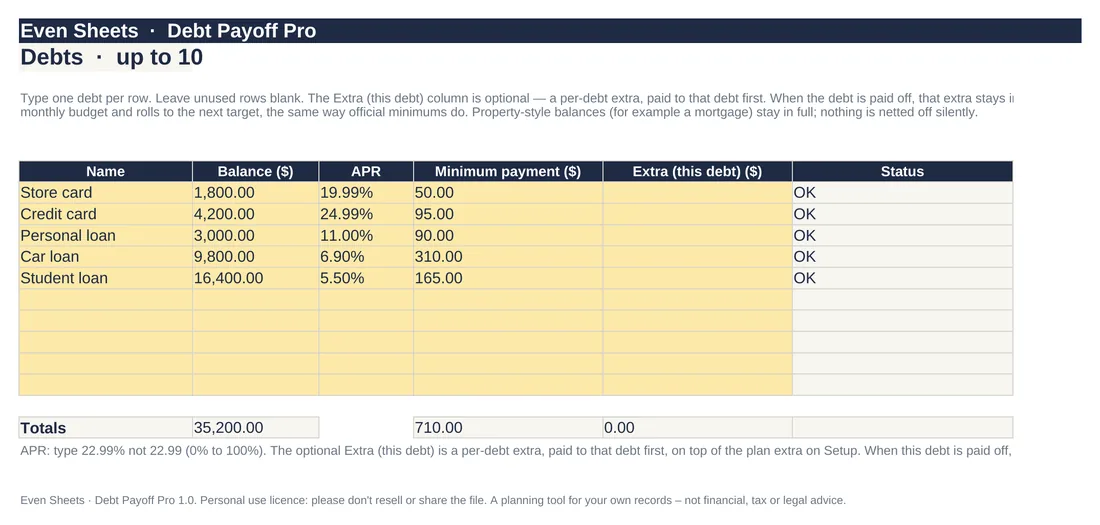
- Debts: up to 10 debts: name, balance, APR with a % sign, official minimum, optional extra
- Dashboard: debt-free date, months, interest and total paid for the strategy you chose
- Compare: snowball, avalanche and minimums only, side by side
- Schedule: every month of your plan
- What-If: type a different extra here, without changing the plan
- Health Check: 11 checks, START / Inputs checked / CHECK / FIX / NOTE
You receive
- Blank planner (.xlsx) and a Sample version with a fictional household
- Getting started guide (PDF), Quick Start (PDF), User Guide (PDF) and a Download & Start sheet
Compatibility
| Microsoft Excel | Tested in Excel for the web. Uses only classic formulas found in Excel 2010 and later (Windows or Mac). Formula cells are protected. Desktop Excel has not been separately retested on this version. |
|---|---|
| Google Sheets | Upload the .xlsx to Google Drive, open it with Google Sheets, then choose File › Save as Google Sheets (steps in the Download & Start sheet). Opened live after that conversion and checked. Google Sheets doesn’t keep Excel’s cell protection, so type only in the yellow cells. |
| Not supported | Apple Numbers. Phone apps are untested; setup is easiest on a computer. |
| Inputs | Type APR with a % sign, e.g. 22.99%. |
| Limits | Up to 10 debts and 20 years. Payoff dates are estimates (fixed APR, no new charges, no fees or rate changes). |
| Licence | Personal use, one household. For planning only; not financial, tax or legal advice. |
How this differs from our Paycheck Budget Planner
The Paycheck Budget Planner’s Debt tab estimates months, a debt-free month and interest for each debt at the payment you type, and puts those payments on the paycheck that covers them. It can show which debt a snowball or avalanche method would target, but it does not run those plans or write out a month-by-month schedule.
Debt Payoff Pro is the payoff planner: a full amortised schedule, snowball versus avalanche versus paying minimums only, payments rolling to the next debt when one is paid off, and a what-if extra that does not change your plan. It does not assign payments to paychecks or track bills.
Download and set up
- Buy on Etsy. Our buttons take you to the product’s Etsy listing. Etsy handles the payment and shows the final price in your currency, including any tax.
- Download in a browser. Your files are ready straight after payment, from Etsy’s Purchases page. Use a web browser: the Etsy app can’t download files.
- Open the Sample, then the Blank. Explore the Sample copy (a fictional household), then fill in the Blank copy. The getting-started guide and the Download & Start sheet cover opening the files in Microsoft Excel and Google Sheets.
Type in the yellow cells: currency and strategy on Setup, then your debts on the Debts tab. The Dashboard and Compare tabs update straight away. Stuck? See Support.
Questions
Does it work on my phone?
It’s designed for a computer. Phone apps haven’t been tested yet, so we don’t promise them.
Does it work in Google Sheets?
Yes. Upload the .xlsx to Google Drive, open it with Google Sheets, then choose File › Save as Google Sheets (steps are also in the Download & Start sheet). Everything calculates the same; the only difference is that Google Sheets does not keep the cell protection, so type only in the yellow cells.
What if I type something wrong?
The Health Check tab flags it with a plain-English message and a fix. In Excel, formula cells are also protected against accidental edits.
Can I use pounds, euros or another currency?
Yes. Type the symbol in Setup; headings and totals use it. The maths is the same in any currency.
How is this different from a simple debt tracker?
You get a full month-by-month amortised schedule, a snowball vs avalanche comparison (plus a minimums-only baseline), an extra-payment what-if, and a debt-free date.
Do you see my data?
No. Your copy lives on your own computer or drive. There is no bank login.
Can I get a refund?
Digital items can’t be returned, but if it doesn’t work for you, message us and we’ll fix it or make it right (Etsy’s case process applies).
How many debts can I enter?
Up to 10 in this version. The schedule runs for up to 20 years (240 months).
See price on Etsy
Etsy shows the final price in your currency, including any tax, before you pay. UK listings include VAT. Checked 24 November 2026.
You’ll complete your purchase on Etsy, which shows the final price in your currency (including any tax) before you pay. Instant digital download; nothing is shipped.
Designed and tested by Even Sheets; AI tools assisted drafting and testing.